
Best laptops for GCSE and A-level students in 2026: four brilliant buys for every budget


This article contains affiliate links. We may earn a small commission on items purchased through this article, but that does not affect our editorial judgement.
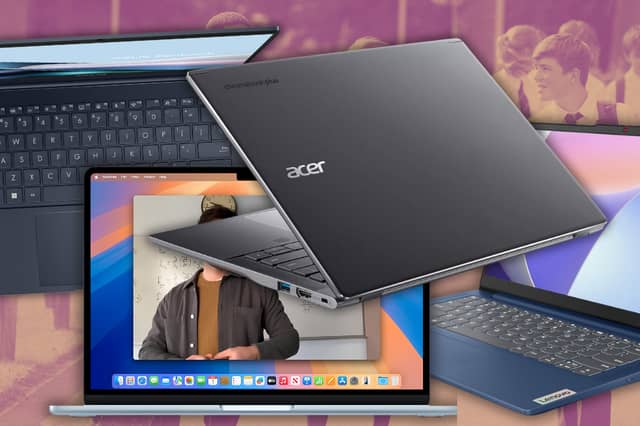
Buying a laptop for secondary school doesn't have to cost a fortune. We explain what UK schools recommend and pick the best laptops for GCSE and A-level students, from budget Windows devices to premium MacBooks.
Buying a laptop for a child starting GCSEs or sixth form can feel overwhelming. Prices range from under £300 to well over £1,000, but the good news is that most UK secondary schools don't expect pupils to have expensive, high-powered computers.
For the vast majority of students, the best school laptop is one that's lightweight enough to carry every day, powerful enough to handle Microsoft 365, Google Classroom and online research, and has enough battery life to get through a full day of lessons. Whether you're buying for a Year 10 pupil beginning GCSEs or a sixth-form student preparing for A-levels, choosing the right specification matters far more than spending the most money.
To help narrow the choice, we've compared current laptops against the specifications most commonly recommended by UK schools, looking at portability, battery life, performance, keyboard quality, value for money and long-term usability.
At a glance
| Award | Laptop | Price | Processor | RAM | Storage |
|---|---|---|---|---|---|
| Best value Windows laptop | Lenovo IdeaPad Slim 3 | £439 on Amazon | Intel Core i5-12450H | 16GB | 512GB SSD |
| Best Chromebook | Acer Chromebook Plus 514 | £327 on Amazon | Intel Core 5 120U | 8GB | 512GB SSD |
| Best premium Windows laptop | ASUS Zenbook 14 OLED UX3405CA | £699 on Amazon | Intel Core Ultra 5 225H | 16GB | 512GB SSD |
| Best overall laptop | Apple MacBook Air M4 | £1,030 on Amazon | Apple M4 | 16GB Unified Memory | 256GB SSD |
What laptop do schools actually recommend?
Before buying, it's worth checking your child's school website or IT department to see whether it recommends Windows laptops or Chromebooks. Many schools now use Google Classroom and cloud-based software, while others rely on Microsoft 365 throughout the curriculum.
Although requirements vary, most schools suggest broadly similar specifications. Look for at least an Intel Core i3 or AMD Ryzen 3 processor, 8GB of RAM, a solid-state drive (SSD) and enough battery life to last a full school day. If your budget stretches a little further, opting for 16GB of RAM and a 256GB or 512GB SSD should help ensure the laptop remains fast throughout GCSEs, A-levels and beyond.
Portability is just as important. A 13- or 14-inch laptop weighing around 1.5kg is far easier to carry between lessons than a bulky 15.6-inch machine, while a comfortable keyboard will make a real difference when pupils are typing coursework, revision notes and university applications.
Our recommended laptops
Best value Windows laptop: Lenovo IdeaPad Slim 3
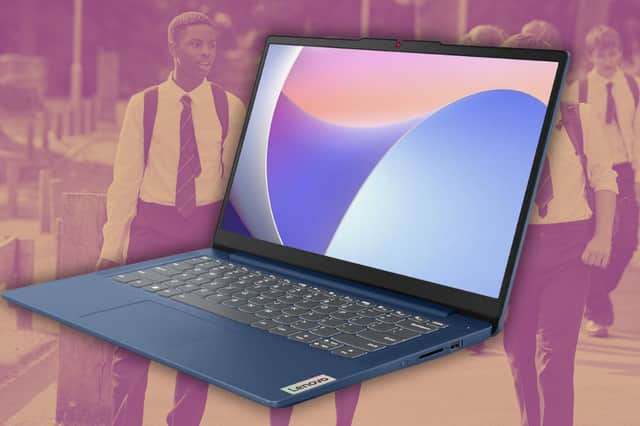
For most parents, this is the laptop we'd recommend first.
Currently available for £439, the Lenovo IdeaPad Slim 3 is one of Amazon's best-selling laptops and offers a specification that's comfortably above what most schools require. Rather than the minimum 8GB of RAM, this version includes 16GB, alongside an Intel Core i5-12450H processor and a generous 512GB SSD.
That means pupils can comfortably run Microsoft Word, Excel, Teams, Google Classroom, web browsers and revision platforms simultaneously without the laptop slowing down. The 14-inch Full HD display is a practical size for both homework and carrying around school, while weighing just 1.37kg means it won't become a burden in an already heavy school bag.
With Wi-Fi 6, rapid charging, USB-C connectivity and a webcam privacy shutter included, it's difficult to think of a better Windows laptop at this price. For most families, this is the sweet spot between affordability and long-term performance.
Best Chromebook: Acer Chromebook Plus 514
If your child's school mainly uses Google Classroom, a Chromebook could save you more than £100 while still providing everything they need.
The Acer Chromebook Plus 514, currently £327.32, is considerably better specified than many budget Chromebooks. It combines an Intel Core 5 processor, 8GB of RAM and an impressive 512GB SSD, making it ideal for web research, Google Docs, Slides, Sheets, online lessons and everyday homework.
Its 14-inch WUXGA display provides more vertical workspace than a standard Full HD screen, making documents easier to read, while ChromeOS boots quickly, updates automatically and is straightforward for younger pupils to use.
As long as the school doesn't require Windows-only software, it's one of the strongest-value education laptops currently available.
Best premium Windows laptop: ASUS Zenbook 14 OLED UX3405CA
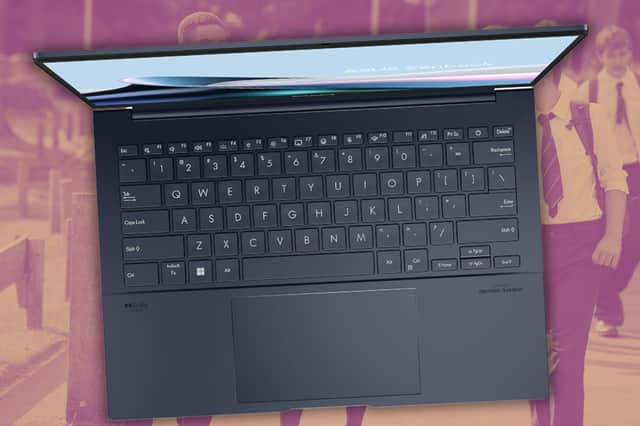
Parents looking for something more premium without stepping up to MacBook prices should take a close look at the ASUS Zenbook 14 OLED UX3405CA.
Priced at £699, it combines an Intel Core Ultra 5 processor, 16GB of RAM and a 512GB SSD, providing more than enough performance for coursework, presentations, Teams calls, programming, photo editing and more demanding sixth-form workloads.
Where it really stands out is its superb OLED display. Text appears noticeably sharper, colours are richer and contrast is far better than on conventional laptop screens, making long study sessions more comfortable. Combined with its premium aluminium chassis and weight of around 1.28kg, it feels every bit like a laptop designed to last.
Students planning to study subjects such as Computer Science, Photography, Design or Media Studies will particularly appreciate the extra performance and display quality.
Best overall laptop: Apple MacBook Air M4
If you're buying one laptop with the intention of it lasting throughout school and into university, the Apple MacBook Air M4 is the standout choice.
The model we've selected comes with 16GB of unified memory and a 256GB SSD, making it a far better long-term option than lower-memory configurations. Apple's M4 processor delivers exceptional performance while remaining completely silent, and battery life is among the best available on any laptop.
Weighing just 1.24kg, it's also one of the easiest laptops to carry every day. The excellent keyboard, superb trackpad and bright 13.6-inch Liquid Retina display make it equally comfortable for writing essays, researching coursework or watching revision videos.
At £1,030.29, it's undoubtedly a significant investment, but it's also the laptop in this guide that's most likely to remain fast and reliable for many years to come.
Windows, Chromebook or Mac?
Windows remains the safest all-round choice because it supports virtually every educational application schools might use, while offering excellent compatibility with Microsoft 365.
Chromebooks make excellent sense if your child's school relies on Google Classroom and browser-based software, especially if you're shopping on a tighter budget.
MacBooks offer outstanding longevity, battery life and build quality, making them an excellent investment for students who expect to keep the same laptop well beyond sixth form.
How we chose these laptops
Rather than simply recommending the newest models, we compared laptops from the biggest manufacturers against the features that matter most to secondary school students.
We prioritised:
- Battery life
- Reliability
- Weight and portability
- Keyboard quality
- Display quality
- Performance in Microsoft 365
- Performance in Google Workspace
- Value for money
- Long-term durability
Common buying mistakes parents make
One of the biggest mistakes is buying a gaming laptop. They're usually much heavier, have shorter battery life and cost significantly more than is necessary for schoolwork.
It's also worth avoiding laptops with only 4GB of RAM. They may appear cheaper, but performance quickly suffers once students have multiple browser tabs, Office applications and video lessons open at the same time.
Finally, don't assume bigger is better. A lightweight 13- or 14-inch laptop is generally much easier for teenagers to carry around school every day than a larger 15.6-inch model.
Frequently asked questions
Yes. For most pupils, 8GB is perfectly adequate for Microsoft Office, Google Classroom, web browsing and coursework. If the budget allows, 16GB offers better long-term value.
Is a Chromebook good enough for secondary school?
Yes, provided the school mainly uses Google Workspace or browser-based software. Always check before buying.
Is 256GB enough storage?
For most students it is. However, a 512GB SSD provides extra room for coursework, projects and downloaded resources over several years.
Can students use their own laptop in GCSE or A-level exams?
Usually not. Where pupils qualify for laptop use under exam access arrangements, schools generally provide their own managed devices.
How long should a school laptop last?
A good-quality laptop bought at the start of Year 10 should comfortably last throughout GCSEs, sixth form and often into university.
The bottom line
You don't need to spend more than £1,000 to buy a laptop capable of seeing a student through secondary school. For most families, choosing a lightweight device with good battery life, at least 8GB of RAM and a fast SSD will make far more difference than paying for unnecessary processing power.
Our top recommendation for most parents is the Lenovo IdeaPad Slim 3 because it combines excellent specifications with a sensible price. The Acer Chromebook Plus 514 is an outstanding alternative for schools using Google Classroom, while the ASUS Zenbook 14 OLED offers a premium Windows experience for students with more demanding needs. Those looking for a laptop that should still be going strong years from now will find the MacBook Air M4 hard to beat.