
Security camera that connects to phone without WiFi: Ultimate guide for new buyers
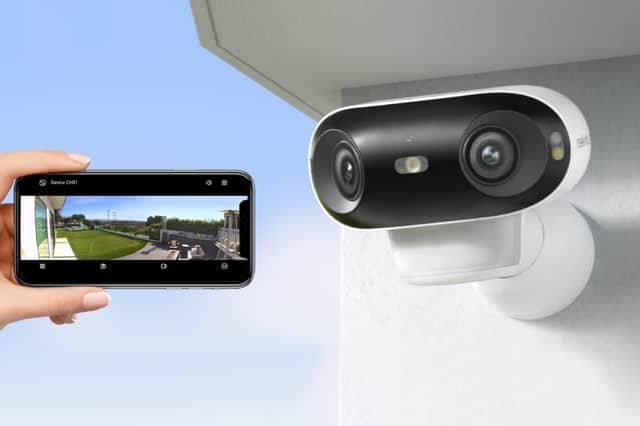

Concerned about not having WiFi and losing access to your property remotely? Nothing to worry about!
A security camera that connects to phone without WiFi offers a solid answer if your building sits beyond the reach of a reliable router. This guide explains what the camera is, why many new buyers now choose it, how to pick the right one, and how to set it up.
Are there security cameras that work without Wi-Fi?
Yes, there are security cameras that can work without WiFi—and they’re a great option if you want to monitor places with no internet connection, like cabins, farms, RVs, or construction sites. Such cameras include the following main types:
● 4G LTE security cameras: These cameras use a SIM card and connect to the cellular network, just like your phone. They don’t need WiFi at all. As long as there’s 4G coverage, you can view live video, receive alerts, and even talk through the camera using an app.
● Wired security cameras: These cameras can record video locally to a microSD card, DVR, or NVR without needing WiFi. Modern wired models are usually powered by PoE technology.
You may wonder why anyone would pick a camera that skips the usual wireless network. Before we dig into features and setup steps, look at the most common reasons.
● Remote sites without an internet line: Farms, barns, and new job sites often lack broadband. A security camera without WiFi still sends video to your phone through 4G, 5G, or a direct‐connect hotspot.
● Backup during network outages: Thieves know how to cut power and internet lines. A CCTV camera that works on its own mobile link keeps recording and alerts you, even if the router goes dark.
● Simpler installation: No router means no password setup and no range limits. You can place the No-WiFI camera, install the app, and start streaming all by yourself.
● Flexible redeployment: Contractors, event planners, and RV owners move from place to place. They can lift a 4G camera, mount it at the next stop, and keep the same phone link.
A modern camera that connects to a phone without WiFi does more than record pictures. It blends mobile data modules, large batteries, smart sensors, and secure storage. So, when you decide to buy a CCTV without WiFi, think through each feature below and match it to your site, routine, and budget.
Clear footage stops doubts in court and speeds up police work. Aim for at least Full HD (1080p). Some 4G models now capture 2K or 4K, yet higher lines per image use more data. Check the frame rate, too. A camera that streams 1080p at 15 fps on a 5 Mbps plan may suit home users, while a depot with fast forklifts may need 30 fps.
Low-light performance also matters. Look for cameras with night vision capability that reach 30 feet or more. Some units add white LEDs for color night vision. Ask how bright those LEDs are, or you may blind the sensor if it sits too near a wall.
Footage goes nowhere if the camera lacks a safe place to keep it. Most mobile models support microSD cards up to 256 GB. Local cards cost little and keep your clips private. Yet a thief can steal the card with the camera, so many makers also run secure cloud plans.
A hybrid plan lets the camera store footage on the SD card, then upload key clips (motion, alarm, or doorbell) to the cloud. Check if uploads cost extra and if the plan throttles the file size. Some free plans limit clips to 10 seconds.
A mast in the woods needs months of runtime. An outdoor use security camera that connects to phone without WiFi often packs a powerful battery that may last several months on motion events. Solar panels extend life far longer. Pick a model with a panel that snaps into a grommet on the body. Angle it toward midday sun for a full recharge cycle.
If you plan indoor use with little sunlight, look for swappable battery packs or a camera that can sit on a USB-C cord when you return to base. Some units also accept 12-volt DC from a car battery or a deep-cycle lead-acid unit in sheds.
Make sure the maker’s app works on both iOS and Android. Check the minimum OS level. Some cheaper imports stop updates after a year and break on the next iOS bump. Also, confirm push alerts, two-way talk, and share links on your phone brand. A few apps skip secure call features on older Samsung devices or entry-level iPhones.
If you hold more than one handset, check how many phones can link to one camera account. Some services cap the number at four, while large families may need eight seats.
Extra features often seal the deal. Pan-tilt-zoom (PTZ) lets you swing the lens up to 360 degrees and zoom 4× or 5× by pinching on the screen.
AI motion tags cut false alarms from waving trees. They can spot people, cars, and pets. Moreover, two-way audio helps you warn a prowler or greet a delivery crew.
Need a dependable security solution without WiFi? You’re in the right place. Reolink, a trusted name in home security, offers high-performance 4G and PoE cameras that keep you protected—even without a wireless connection.
If you need reliable surveillance in places where Wi-Fi or power lines can’t reach—like construction sites, cabins, farms, or RVs—the Reolink Go PT Ultra can be a good option. This 4G LTE security camera offers sharp 4K Ultra HD resolution, pan & tilt coverage, and Color night vision.
It’s completely wire-free, runs on a rechargeable battery or solar power, and supports smart detection for people, vehicles, and animals. You can monitor your property from anywhere via the Reolink app.
Clear footage stops doubts in court and speeds up police work. Aim for at least Full HD (1080p). Some 4G models now capture 2K or 4K, yet higher lines per image use more data. Check the frame rate, too. A camera that streams 1080p at 15 fps on a 5 Mbps plan may suit home users, while a depot with fast forklifts may need 30 fps.
Low-light performance also matters. Look for cameras with night vision capability that reach 30 feet or more. Some units add white LEDs for color night vision. Ask how bright those LEDs are, or you may blind the sensor if it sits too near a wall.
Footage goes nowhere if the camera lacks a safe place to keep it. Most mobile models support microSD cards up to 256 GB. Local cards cost little and keep your clips private. Yet a thief can steal the card with the camera, so many makers also run secure cloud plans.
A hybrid plan lets the camera store footage on the SD card, then upload key clips (motion, alarm, or doorbell) to the cloud. Check if uploads cost extra and if the plan throttles the file size. Some free plans limit clips to 10 seconds.
A mast in the woods needs months of runtime. An outdoor use security camera that connects to phone without WiFi often packs a powerful battery that may last several months on motion events. Solar panels extend life far longer. Pick a model with a panel that snaps into a grommet on the body. Angle it toward midday sun for a full recharge cycle.
If you plan indoor use with little sunlight, look for swappable battery packs or a camera that can sit on a USB-C cord when you return to base. Some units also accept 12-volt DC from a car battery or a deep-cycle lead-acid unit in sheds.
Make sure the maker’s app works on both iOS and Android. Check the minimum OS level. Some cheaper imports stop updates after a year and break on the next iOS bump. Also, confirm push alerts, two-way talk, and share links on your phone brand. A few apps skip secure call features on older Samsung devices or entry-level iPhones.
If you hold more than one handset, check how many phones can link to one camera account. Some services cap the number at four, while large families may need eight seats.
Extra features often seal the deal. Pan-tilt-zoom (PTZ) lets you swing the lens up to 360 degrees and zoom 4× or 5× by pinching on the screen.
AI motion tags cut false alarms from waving trees. They can spot people, cars, and pets. Moreover, two-way audio helps you warn a prowler or greet a delivery crew.
Need a dependable security solution without WiFi? You’re in the right place. Reolink, a trusted name in home security, offers high-performance 4G and PoE cameras that keep you protected—even without a wireless connection.
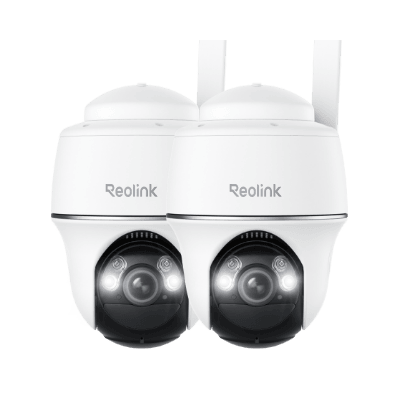
Reolink Go PT Ultra
If you need reliable surveillance in places where Wi-Fi or power lines can’t reach—like construction sites, cabins, farms, or RVs—the Reolink Go PT Ultra can be a good option. This 4G LTE security camera offers sharp 4K Ultra HD resolution, pan & tilt coverage, and Color night vision.
It’s completely wire-free, runs on a rechargeable battery or solar power, and supports smart detection for people, vehicles, and animals. You can monitor your property from anywhere via the Reolink app.
Pros:
● Perfect for areas without Wi-Fi or power
● 4K UHD clarity + 355° pan & 140° tilt
● Works with solar panel
Cons:
● Built-in battery is not user-removable
● 4K video offers high clarity but may require more storage space
Reolink Go Ranger PT
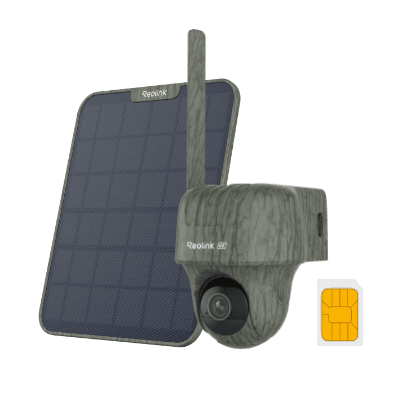
If you’re looking for a truly wireless security solution that doesn’t rely on Wi-Fi or power outlets, consider the Reolink Go Ranger PT. Designed for remote locations, this 4G camera offers ultra-sharp 4K UHD resolution and pan-tilt functionality. For those who want to keep an eye on a farm, or wildlife in the field, this camera ensures you won’t miss a detail.
Pros:
● True 4K HDR & 360° pan & tilt
● Invisible night viewing that won’t disturb wildlife
● Smart animal detection and reduced false alarms
Cons:
● Battery life declines in shaded areas; the included 6 W panel struggles under dense canopy
● Battery is non-removable; siren is relatively quiet
Reolink TrackMix PoE
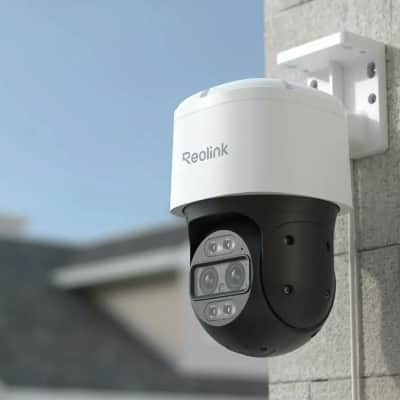
PoE units are another good option for those looking for non-WiFi cameras. The Reolink TrackMix PoE is a powerful outdoor security camera that combines a wide-angle lens and a telephoto lens to deliver both panoramic and zoomed-in views simultaneously.
With 4K resolution, color night vision, and two-way audio, it ensures clear footage and real-time communication. Powered and Connected through PoE, it offers easy installation and stable network performance.
Pros:
● Dual‑lens 4K clarity in one single camera
● Effective auto-tracking over a relatively large area
● Local storage and no subscription fees
Cons:
● Bulkier than typical cameras due to dual-lens and PTZ mechanism
How to set up a security camera that connects to phone without WiFi?
Setting up and using non-WiFi cameras may look scary on day one. A well-built outdoor or indoor camera without WiFi works in three short steps. Read the maker’s manual, yet the flow below covers most models.
Step 1: Installation Process
Fix the mount to a solid beam or wall. Use the supplied screws and anchors if you drill into brick or sheetrock. Point the lens away from the direct sun. If you fit a solar panel, face it south (in the Northern Hemisphere) and tilt it at your local latitude.
Insert the microSD card in the slot. Push in the data SIM. Lock gaskets tight to keep rain out. Hold the power button until the lights blink.
Step 2: Connecting Camera to the Phone
Download the vendor’s app from the App Store or Google Play. Open the app and tap “add device.” The app asks you to scan a QR code with the camera or on the box. Once scanned, the app shows the IMEI and prompts a name such as “Barn Cam.”
Next, enter the APN details for your mobile carrier if the app does not auto-detect them. The screen shows signal bars once it joins the cell tower. Tap “live view” and watch a real-time feed.
Step 3: Using the App or Software
Explore the main tabs in most apps: Live, Events, Storage, Settings. In Settings, switch on motion alerts, set the area mask if you want to ignore the nearby road, and choose clip length. In Events, watch the log and hit “download” to save a clip to the phone.
Set update checks to auto so firmware stays secure. Some apps allow scheduled arm/disarm periods, which helps offices that open at fixed hours.
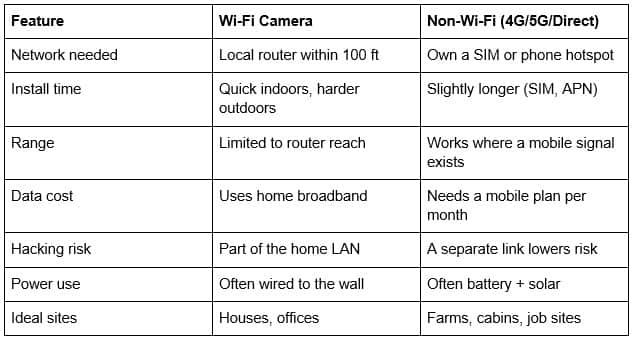
Comparing security camera with and without WiFi
To assist in your decision-making process, the table below outlines the key differences between WiFi and non-WiFi models.
FAQs
Can I connect a camera to my phone without WiFi?
Yes. Choose a 4G/5G model that holds a data SIM. Insert the SIM, launch the vendor’s app, and you stream video anywhere you get cell coverage.
Is there a security camera that does not require WiFi?
Many brands sell one. Reolink Go series, Arlo Go line, and some trail cameras send clips over mobile data. They stand alone and need no router.
What is the best camera that connects to your phone without WiFi?
Among current picks, Reolink Go Plus ranks high. It shoots 2K video, runs on a large battery with an optional solar panel, and streams over 4G LTE. The app supports both iOS and Android, allows two-way talk, and stores clips on a 128 GB card or the Reolink cloud.
Do security cameras record without Wi-Fi?
Yes, as long as they include local or cloud storage through another link. A CCTV without wifi can write to an SD card inside the unit. Some keep rolling footage and overwrite old clips when the card fills.
Conclusion
A security camera that connects to phone without WiFi solves big gaps left by router-based gear. It guards farms, holiday cabins, work sites, and city flats during outages. Pick a clear video, solid storage, long battery life, and strong app support. Follow the three setup steps and test alerts on day one. Share your thoughts under this guide and tell us how a camera without WiFi changed your sense of safety.